

Who depends on a site to win customers and sell more assertively, needs to understand the importance of page speed to provide a good user experience. Having a site that opens and loads quickly is one of the most direct levers to increase search traffic, reduce the bounce rate and get the best results.
The first step to optimize the speed of your website's pages is to measure and identify where the bottlenecks are. There are many tools to do speed checking, but Google's PageSpeed Insights is perhaps the most complete in terms of actionable improvements and recommendations.
In this article I will make an introduction to the tool for you to use in the most efficient way and show how the score affects the search ratings. I intend to explain to you also, why you should not pursue a score of 100/100 and then reveal some common bottlenecks of page speed what they mean and how to fix them.
See also:
- WaveMaster AI closes 192 spots in Brazil by integrating 20 monitored beaches and over 800 beaches on 6 continents
- Gastronomy and Culture: A Meeting That Transcends Tastes
- Forget the “123456”: How a Password Manager Can Simplify Your Digital Life (and Avoid Head Pain)
- Nationalvox is honored by ALESC for its 20 years of innovation in digital marketing
- NVX 20 years: A history of innovation, partnership and success in digital
- Digital Transformation in Cuiabá Companies: Benefits and Challenges
- Password Manager: The Unnegotiable Pillar of Your Digital Security in the Connected Age
- Social media trends for 2024: platforms that are shaping digital marketing
- The Power of Google Evaluations: How to Improve Your Business’s Reputation
- How to make a diagnosis of your website performance
What is Google Speed Insights?
It's a Google toolavailable HERE which helps editors measure the time of loading their web pages on desktops and mobile devices, identify bottlenecks and use this information to optimize the upload speed of the website page.
You can insert any URL and run the test. After the test, Google assigns a speed score that goes up to 100 to the site you tested, based on various recommended charging performance practices.
You can also get a list of recommendations to improve your score and, consequently, the overall speed of loading your site.
From now on it can get a little complicated for those who do not have programming knowledge, but if you use WordPress as a site platform, it is possible to implement many of these recommendations without any coding knowledge.
Understand why not pursue a 100/100 score
Do not try to reach the maximum score of Google PageSpeed Insights. After your site reaches a reasonably good page speed score and it can be anything between 90/100, your site users are probably experiencing all the benefits associated with fast page loading speed. Trying to reach a perfect 100/100 score is not easy or necessarily useful.
What matters most is how well you have executed the PageSpeed recommendations, rather than reaching a certain number. Over-optimisation may also mean having to eliminate essential elements of design and usability that are crucial to providing a good overall user experience.
For this reason, it is important to have a broad view of how users experience the site in a real-world environment and do not compromise the form or function to accelerate the site.
I also need to point out that, as useful as PageSpeed Insights can be, it is not the last word in page speed optimization. It's what Google considers most important. For example, a site may have a page loading time of less than 500 ms, but still get a bad score on PageSpeed Insights.
Try testing other page speed tools. You will notice that the numbers of different tools do not match precisely, which shows how arbitrary these tests can be. However, as the goal here is, we will highlight Google PageSpeed Insights.
What does Google have to do with this?
The answer is, everything. Obviously, in addition to providing the tool, Google also operates the world's largest search engine. Therefore, the natural conclusion to be drawn is that PageSpeed score can also affect search ratings. And yes, Google does the page speed of use as a sorting sign.
Since 2018, Google has used mobile page speed as a ranking factor for search results. In June 2021, the search giant updated its algorithm to include Core Web Vitals as a classification sign for desktop results.
The final result is that PageSpeed Insights scores are more than just a custom metric. Google really believes and bets on its page test methodology and therefore rewards sites that have a good PageSpeed score with better ratings and more traffic through their search engine.
How to use Google PageSpeed Insights?
Besides being free, it is a very simple tool to use.
- Access Google PageSpeed Insights page
- Enter or paste the URL site you want to parse
- Click on parse
Chrome has extensions to run the analysis directly in the browser. However, take into account that Google itself recommends using the site because it does not trust the extensions developed by third parties.
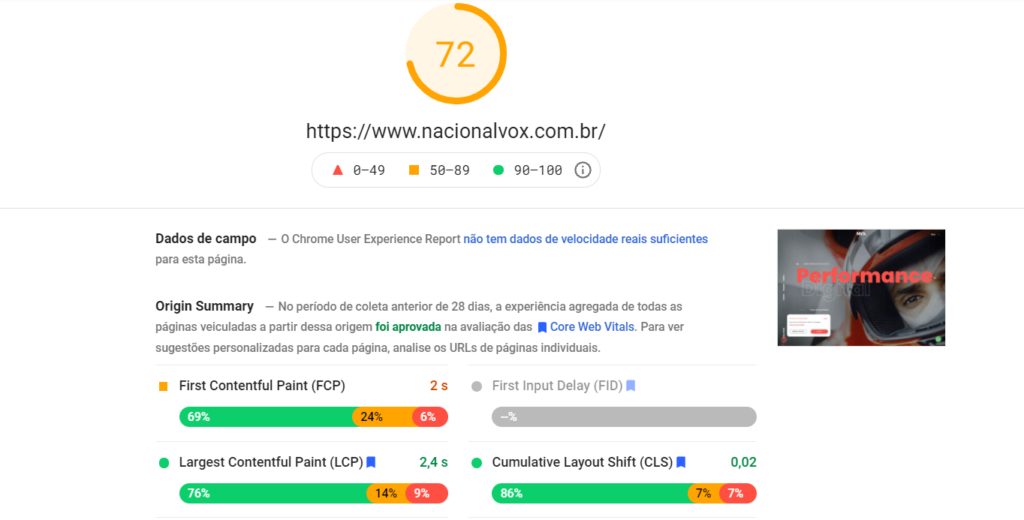
Once the analysis is completed, you will see a screen as in the example below:
Contents
Toggle- How to improve score?
- 1. Optimize HTML code
- 2. Optimized Images
- 3. AMP
- 4. Content Delivery Network (CDN)
- 5. Retard uploading of images off screen
- 6. Improve server response time
- 7. Mining
- 8. Browser Cache
- 9. Clear redirects
To help with this task, I have gathered some tips for you to apply with the recommendations of PageSpeed Insights in a precise and correct way, improving your grade and focusing on performance and user experience.
1. Optimize HTML codeTry to improve HTML code. This will help in page performance, as duplicate codes or purposeless tags hinder server reading. It is important to organize the code with compression tools, for example (winrar), which help optimize HTML in a practical way.
2. Optimized ImagesImproving your images is an important item and is usually one of the main causes of page loading delay. You can optimize:
- the size of an image;
- The display size in relation to the actual image size in pixels.
In addition, it is important to postpone uploading images off screen, using a content delivery network (CDN) when choosing state-of-the-art images.
3. AMPAMP may be an unknown acronym for you, but it is a Google tool that facilitates loading on mobile devices, prioritizing user experience with fast and simplified access, offering a more basic and functional mobile version, without unnecessary features that make the page heavy.
4. Content Delivery Network (CDN)You never heard of it, either? CDN delivers server load through several different locations and uses the closest to the user to meet requests. The closer the CDN data and users are, the faster the load time will be.
5. Retard uploading of images off screenIt is possible to delay access to images only when the user uses the scroll bar. Avoiding all of these being loaded at the same time, this contributes to the delay in delivering the content and slowness of the page.
6. Improve server response timeIt means ensuring that the site is hosted on a great server. So if Google PageSpeed Insights recommends the criteria, contact the hosting provider or seek hosting solutions that are more appropriate to your website.
7. MiningThe name says everything. To minimize is to delete whitespaces and comments, in the developers' work, to improve CSS and JS files, and optimize loading time.
8. Browser CacheGoogle PageSpeed Insights considers the amount of resources the browser needs to assimilate from your page to display when resolicited. This memory is defined by the cache. The better it is organized, the easier the browser can rescue the page by cache.
9. Clear redirectsGoogle PageSpeed Insights will also suggest that redirects are cleaned, as their accumulation also slows down when browsers request additional HTTP.
You're in doubt with so many terms and settings? Try learning a little more by searching on Google itself or hire a website developer/programmer.
How Google PageSpeed Insights Count Works
The note your site receives when you type the URL into the tool is not random, and it could not be. We need to understand the process of analysis well so that it is accurate and above all, reliable.
So the question is, what criterion does Google use when determining the note that each web page should receive, both on mobile and desktop?
Basically, PageSpeed Insights does two things:
- Analyze the upload time of your page and how many features it has (plugins, code scripts that communicate more often with the server and make the page take longer to load).
- Compares these data with the average of all analyzed pages.
After this comparison, the tool makes a simple but objective report, showing:
- what is the average time of loading of pages on the internet;
- what is your loading time;
- your final grade;
- suggestions for improvements to optimize your loading.
And how is that note given? It goes from 0 to 100, and is defined when the algorithm compares the site with the good practices suggested by Google itself to optimize performance.
At the end, after scanning, the note is given based on how much space there is for improvement and optimization, i.e. how many recommended points you still have to apply. The real definition of the word “insights”.
Next to the note in number, let's say your site has reached a score of 79, there is a classification in text:
- Good score from 80
- Average score between 60 and 79
- Bad score from 0 to 59
Conclusion
As you have seen so far, there is no way to ignore the importance of having a site that loads quickly and, fortunately, you now know a little more about what it is, what it is not and how the Google PageSpeed Insights tool works, as well as improving the speed of your site.
I know it's often hard to know where to start, but by taking the time to understand where you can achieve the greatest impact, you can start working with your developers to put into practice a prioritized action plan and change things.
Impact not only on SEO performance of your site, but also on converting users into a higher rate. Needing help with that? Talk to me by clicking HERE.













